It seems that the maintainer of the wireshark package in Fedora has updated to version 1.8.1 in the current Fedora Rawhide, which will become Fedora 18. The schedule tells us that Fedora 18 is planned to be released on 2012-11-06 (the latest schedule may have an updated date).
This is good news for the Gluster Community (and support engineers like me), as Wireshark 1.8 contains support for most of the Gluster protocols:
Comments on the support in Wireshark are much appreciated, send them to gluster-devel@nongnu.org, file an issue in my development repository or in the Wireshark Bugzilla.
Gluster support for Wireshark is maturing!
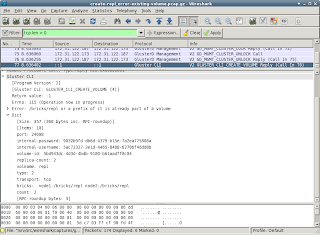
A lot of changes were committed recently to the gluster-wireshark repository. A lot of effort was put into the details (click on the image to enlarge):
The full log is available, and so are updated RPMs for Fedora-16, Fedora-17 and EPEL-6. If installing a patched Wireshark isn't an option, you can build a wireshark-plugin-gluster easily with the steps in the provided README. On the project wiki, there are some pre-captured tcpdumps for consumption. Only a hand full of minor issues are know at this time, more reviewing and reporting is definitely welcome!
If you notice that some packets/frames are not displayed as Gluster, and you think they should, check gluster-wireshark wiki where is explained how to prevent PCEP and other protocols from claiming packers/frames.
- UUIDs and GFIDs are now displayed as 4-2-2-2-6 bytes

- flags for OPEN, CREATE etc are now shown in detail
- mode/umask permissions are now shown in detail
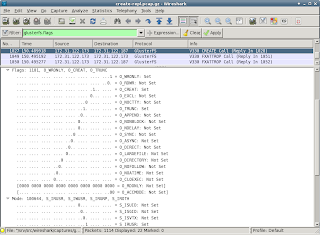
- dictionaries are displayed more user friendly
The full log is available, and so are updated RPMs for Fedora-16, Fedora-17 and EPEL-6. If installing a patched Wireshark isn't an option, you can build a wireshark-plugin-gluster easily with the steps in the provided README. On the project wiki, there are some pre-captured tcpdumps for consumption. Only a hand full of minor issues are know at this time, more reviewing and reporting is definitely welcome!
If you notice that some packets/frames are not displayed as Gluster, and you think they should, check gluster-wireshark wiki where is explained how to prevent PCEP and other protocols from claiming packers/frames.
Updated Wireshark packages for RHEL-6 and Fedora-17 available for testing
[From an email to the gluster-devel mailinglist] today I have merged support for GlusterFS 3.2 and 3.3 into one Wireshark
'dissector'. The packages with date 20120516 in the version support both
the current stable 3.2.x version, and the latest 3.3.0qa41. Older 3.3.0
versions will likely have issues due to some changes in the RPC-AUTH
protocol used. Updating to the latest qa41 release (or newer) is
recommended anyway. I do not expect that we'll add support for earlier
3.3.0 releases.
My repository with packages for RHEL-6 and Fedora-17 contains a .repo
file for yum (save it in /etc/yum.repos.d):
- http://repos.fedorapeople.org/repos/devos/wireshark-gluster/
RPMs for other Fedora or RHEL versions can be provided on request. Let
me know if you need an other version (or architecture).
Single patches for some different Wireshark versions are available from
https://github.com/nixpanic/gluster-wireshark.
A full history of commits can be found here:
- https://github.com/nixpanic/gluster-wireshark-1.4/commits/master/
(Support for GlusterFS 3.3 was added by Akhila and Shree, thanks!)
Please test and report success and problems, file a issues on github:
https://github.com/nixpanic/gluster-wireshark-1.4/issues
Some functionality is still missing, but with the current status, it
should be good for most analysing already. With more issues filed, it
makes it easier to track what items are important.
Of course, you can also respond to this email and give feedback 
After some more cleanup of the code, this dissector will be passed on
for review and inclusion in the upstream Wireshark project. Some more
testing results is therefore much appreciated.
Correcting broken startup of rsyslogd in a systemd unit file
My Fedora 17 Beefy Miracle alpha1 ARM system does not any contents in
Starting the daemon by hand, does not give any issues, so at least rsyslogd does not have an issue itself.
Checking the configuration, there are two unit files that may be used to start
I'm not sure what causes that (SElinux is disabled), but it is currently no big issue for me.
/var/log/messages. This is very impractical for troubleshooting. The command systemd-journalctl --no-tail shows that rsyslog.service fails to start correctly. Bummer!Starting the daemon by hand, does not give any issues, so at least rsyslogd does not have an issue itself.
Checking the configuration, there are two unit files that may be used to start
rsyslogd:/etc/systemd/system/syslog.service/etc/systemd/system/multi-user.target.wants/rsyslog.service
/usr/lib/systemd/system/rsyslog.service) that comes with the rsyslogd package: [Unit]
Description=System Logging Service
[Service]
EnvironmentFile=-/etc/sysconfig/rsyslog
ExecStartPre=/bin/systemctl stop systemd-kmsg-syslogd.service
ExecStart=/sbin/rsyslogd -n $SYSLOGD_OPTIONS
Sockets=syslog.socket
StandardOutput=null
[Install]
WantedBy=multi-user.target
All looks pretty neat, there is no very obvious issue here. However, on checking what this systemd-kmsg-syslogd.service is and does, I seem to be unable to find the unit file that defines this service. Just guessing, but if the ExecStartPre fails, it may not even try to start the rsyslog-daemon. Just commenting out the ExecStartPre is Not Done with the systemd configuration files. The advised way to change unit files which live under /usr/lib/systemd should be copied to the /etc/systemd/* directories instead: # cd /etc/systemd/system
# rm syslog.service
# ln -s /usr/lib/systemd/system/rsyslog.service syslog.service
# cd multi-user.target.wants
# rm rsyslog.service
# ln -s ../syslog.service rsyslog.service
Now is is possible to change the unit file, without changing a file that may be replaced by a update of the rsyslog package. Commenting out the ExecStartPre in the new copy of syslog.service and rebooting, makes syslog work for me and /var/log/messages contains all the logs as expected. More brokenness in my systemd configuration
One more annoying thing is thatsystemctl is not very usable: # systemctl status rsyslog.service
Failed to get D-Bus connection: No connection to service manager.
Although D-Bus is running: # ps v -C dbus-daemon
PID TTY STAT TIME MAJFL TRS DRS RSS %MEM COMMAND
1474 ? Ss 0:00 6 265 2770 1436 0.3 /bin/dbus-daemon --system --address=systemd: --nofork --systemd-activation
I'm not sure what causes that (SElinux is disabled), but it is currently no big issue for me.
WLAN configuration of NetworkManager from the console
It seems that configuring a WLAN connection in NetworkManager on Fedora (tested on F17 alpha on ARM) is pretty straight forward. Unfortunately I was not able to find documentation about the steps, so I just note them down here:
I must confess, that I cheated a little, as the configuration was initially created with
The configuration consists out of two files:
After putting these two files in place (copied from an other device after booting) made NetworkManager connect to the WLAN immediately.
Some tools for checking the connection are:
I must confess, that I cheated a little, as the configuration was initially created with
nm-connection-editor by selecting the 'Available to all users' option. Copying the configuration files to the Fedora 17 rootfs image made my wireless work immediately.The configuration consists out of two files:
/etc/sysconfig/network-scripts/ifcfg-MyWLANwhereMyWLANis just a name for your connectionESSID="MyESSID"Of course it is needed to change at least the
MODE=Managed
KEY_MGMT=WPA-PSK
TYPE=Wireless
BOOTPROTO=dhcp
DEFROUTE=yes
IPV4_FAILURE_FATAL=yes
IPV6INIT=no
NAME=MyWLAN
UUID=57fc7596-af3e-48af-8d90-1a06783083d7
ONBOOT=yes
PEERDNS=yes
PEERROUTES=yesNAMEand theESSID.KEY_MGMTcan probably have other values, but there is no need for me to research that atm./etc/sysconfig/network-scripts/keys-MyWLANWPA_PSK="My Top Secret Password"This password will likely not work anywhere, just change it to whatever is needed.
After putting these two files in place (copied from an other device after booting) made NetworkManager connect to the WLAN immediately.
Some tools for checking the connection are:
nm-toolwhich displays the detected networks and some more details.nmcli con up MyWLANin case you want to force connecting to the WLAN configured under/etc/sysconfig/network-scripts/ifcfg-MyWLAN.
Improvements on displaying Gluster traffic with Wireshark
Slow but steadily I am improving the packet dissector for Gluster. Once it is in a more complete state, it'll be submitted for inclusion in Wireshark. Until that time (which will likely take some more months), updated versions of Wireshark for RHEL6 and F16 will occur on the Fedora People Repository at
The current packages can not only detect most of the Gluster traffic as explained in a previous post, but also display some of the more complex XDR structures used.
A screen shot of one example with Wireshark on Fedora 16:
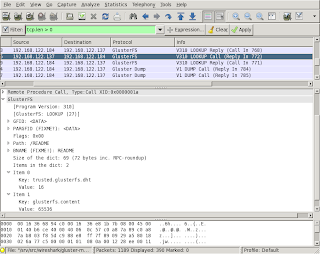
Some of the captions in the display contain
There is an open invite to improve the decoding done by the dissector. The code is (hopefully) easy to understand and should provide a low entry level. There are quite some notes in the code where it needs improvement (search for
Coding is one thing, documenting the protocol is something that is closely related to the Wireshark dissector. How would reading traffic help, when you can not check if what you see is what should be happening? A start with documenting this can be found in my github repository which contains the latest sources.
http://repos.fedorapeople.org/repos/devos/wireshark-gluster/.The current packages can not only detect most of the Gluster traffic as explained in a previous post, but also display some of the more complex XDR structures used.
A screen shot of one example with Wireshark on Fedora 16:
Some of the captions in the display contain
FIXME or similar notes. These are mainly reminders for myself, but also should be helpful for people trying the packages and suggesting improvements. Just by reading the Gluster sources, it is not always clear what the specific fields in the communication should be called in a user friendly way.There is an open invite to improve the decoding done by the dissector. The code is (hopefully) easy to understand and should provide a low entry level. There are quite some notes in the code where it needs improvement (search for
FIXME in the main .c file).Coding is one thing, documenting the protocol is something that is closely related to the Wireshark dissector. How would reading traffic help, when you can not check if what you see is what should be happening? A start with documenting this can be found in my github repository which contains the latest sources.
Displaying Gluster traffic in Wireshark
As part of my job, I am doing some tests with the Red Hat Storage Software Appliance. The current version of RHSSA is based on Gluster 3.2.5. After some experiments, it seem that Gluster is pretty cool and surprisingly easy to setup.
In order to see what is going happening on the network, I captured some tcpdumps. Reading the files in Wireshark, does not show any Gluster specifics. It seems that Wireshark does not know how to decode (or rather dissect) the Gluster traffic. Very unfortunate, as quite some future troubleshooting and performance analysis may require investigating the network packets.
Luckily the Wireshark Developer's guide contains a chapter on Adding a basic dissector. After writing some code and tests, I now have some Wireshark packages that recognize some Gluster communication. The RPMs are available for testing, feedback over email is appreciated.
With the updated packages, the output of tshark (the terminal version of Wireshark) identifies some Gluster packets:
As with several other protocols, Wireshark detects some packets as non-gluster ones. In this tcpdump, there surely is no PCEP traffic (last line in the above output). Each dissector for a protocol should do some sanity checks to see if a packet belongs to its protocol. These checks are not easy to do, and hence quite some protocols detect packets from Gluster as their communication stream.
Luckily it is possible to disable a protocol in the
After these steps,
In order to see what is going happening on the network, I captured some tcpdumps. Reading the files in Wireshark, does not show any Gluster specifics. It seems that Wireshark does not know how to decode (or rather dissect) the Gluster traffic. Very unfortunate, as quite some future troubleshooting and performance analysis may require investigating the network packets.
Luckily the Wireshark Developer's guide contains a chapter on Adding a basic dissector. After writing some code and tests, I now have some Wireshark packages that recognize some Gluster communication. The RPMs are available for testing, feedback over email is appreciated.
With the updated packages, the output of tshark (the terminal version of Wireshark) identifies some Gluster packets:
$ tshark -r gluster-communication.cap 'tcp.len > 0' | head
  7   0.002572 192.168.122.184 -> 192.168.122.137 Gluster Dump V1 DUMP Call
  8   0.002633 192.168.122.184 -> 192.168.122.137 Gluster Dump V1 DUMP Call
 11   0.002909 192.168.122.137 -> 192.168.122.184 Gluster Dump V1 DUMP Reply (Call In 7)
 12   0.002918 192.168.122.137 -> 192.168.122.184 Gluster Dump V1 DUMP Reply (Call In 8)
 15   0.003104 192.168.122.184 -> 192.168.122.137 Gluster Portmap V1 PORTBYBRICK Call
 16   0.003158 192.168.122.184 -> 192.168.122.137 Gluster Portmap V1 PORTBYBRICK Call
 17   0.003298 192.168.122.137 -> 192.168.122.184 Gluster Portmap V1 PORTBYBRICK Reply (Call In 15)
 18   0.003310 192.168.122.137 -> 192.168.122.184 Gluster Portmap V1 PORTBYBRICK Reply (Call In 16)
 31   3.013909 192.168.122.184 -> 192.168.122.137 Gluster Dump V1 DUMP Call
 32   3.013965 192.168.122.184 -> 192.168.122.137 PCEP Unknown Message (0).
As with several other protocols, Wireshark detects some packets as non-gluster ones. In this tcpdump, there surely is no PCEP traffic (last line in the above output). Each dissector for a protocol should do some sanity checks to see if a packet belongs to its protocol. These checks are not easy to do, and hence quite some protocols detect packets from Gluster as their communication stream.
Luckily it is possible to disable a protocol in the
~/.wireshark/disabled_protos file. Finding the correct names of a protocol isn't always straight forward. Use Wireshark to graphically create the file is the easiest, it also takes care of disabling the protocols that are possibly encapsulated. In Wireshark- go to Analyze in the menu
- click "Enabled Protools"
- uncheck PCEP (and while you are at it, also uncheck SSL as it gives the same issues)
After these steps,
tshark should recognize all traffic to and from port 24007 as belonging to one of the Gluster protocols. I have only tested the Wireshark dissectors on Gluster 3.2.5, later releases use some newer versions of some protocols and these may not be detected yet.
Unexpected requirements for creating a video DVD with Brasero
With the current standard of mobiles and photo cameras that can be used to film things, it would be fun to create a little video. It seems that Brasero is a standard tool for the GNOME desktop, which should work without issues in my preferred XFCE as well. Brasero (and seemingly all of its dependencies) is even included in the Red Hat Enterprise Linux 6.2 Workstation repository/channel.
Unfortunately, after creating a video project in Brasero, a little warning gets displayed:
There is the need for a more detailed look into how Brasero does the detection/loading of plugins. In the search for more verbosity from the command-line, I found that the command
After some googling, it seems that these packages are made available for RHEL6 in Repoforge (previously RPMForge). The additional packages that need to get installed (first pass):
Getting closer, but not completely there yet, as
Knowing that Brasero uses the GStreamer framework, it seems logical to try to install a GStream plugin called
This whole troubleshooting took quite a while, and I do not know if all the new packages are really needed, or if a subset is sufficient. Glad it's over, working and documented for a next time too (and possibly others).
Unfortunately, after creating a video project in Brasero, a little warning gets displayed:
It is not possible to write with the current set of plugins.There is the need for a more detailed look into how Brasero does the detection/loading of plugins. In the search for more verbosity from the command-line, I found that the command
brasero --help shows that there is a --help-brasero-burn option. Giving that a try, dumps an immense list of things on the console. This includes the following:- ffmpeg_mpeg2video is missing
(brasero:19298): BraseroBurn-DEBUG: At burn-plugin-manager.c:452: loading /usr/lib64/brasero/plugins/libbrasero-vob.so
(brasero:19298): BraseroBurn-DEBUG: At burn-plugin.c:1041: Module encountered an error while registering its capabilities:
"ffenc_mpeg2video" element could not be created
(brasero:19298): BraseroBurn-DEBUG: At burn-plugin-manager.c:481: Load failure, no GType was returned "ffenc_mpeg2video" element could not be created - libdvdcss is missing
(brasero:19298): BraseroBurn-DEBUG: At burn-plugin-manager.c:452: loading /usr/lib64/brasero/plugins/libbrasero-dvdcss.so
(brasero:19298): BraseroBurn-DEBUG: At burn-plugin.c:1041: Module encountered an error while registering its capabilities:
Encrypted DVD: please install libdvdcss version 1.2.x
(brasero:19298): BraseroBurn-DEBUG: At burn-plugin-manager.c:481: Load failure, no GType was returned Encrypted DVD: please install libdvdcss version 1.2.x - dvdauthor is missing
(brasero:19298): BraseroBurn-DEBUG: At burn-plugin-manager.c:452: loading /usr/lib64/brasero/plugins/libbrasero-dvdauthor.so
(brasero:19298): BraseroBurn-DEBUG: At burn-plugin.c:1041: Module encountered an error while registering its capabilities:
"dvdauthor" could not be found in the path
(brasero:19298): BraseroBurn-DEBUG: At burn-plugin-manager.c:481: Load failure, no GType was returned "dvdauthor" could not be found in the path - vcdimager is missing
(brasero:19298): BraseroBurn-DEBUG: At burn-plugin-manager.c:452: loading /usr/lib64/brasero/plugins/libbrasero-vcdimager.so
(brasero:19298): BraseroBurn-DEBUG: At burn-plugin.c:1041: Module encountered an error while registering its capabilities:
"vcdimager" could not be found in the path
(brasero:19298): BraseroBurn-DEBUG: At burn-plugin-manager.c:481: Load failure, no GType was returned "vcdimager" could not be found in the path
After some googling, it seems that these packages are made available for RHEL6 in Repoforge (previously RPMForge). The additional packages that need to get installed (first pass):
- gstreamer-ffmpeg
- libdvdcss
- dvdauthor
- vcdimager
Getting closer, but not completely there yet, as
brasero --brasero-burn-debug still misses something:(brasero:19508): BraseroBurn-DEBUG: At burn-plugin-manager.c:452: loading /usr/lib64/brasero/plugins/libbrasero-vob.so
(brasero:19508): BraseroBurn-DEBUG: At burn-plugin.c:1041: Module encountered an error while registering its capabilities:
"mplex" element could not be created
(brasero:19508): BraseroBurn-DEBUG: At burn-plugin-manager.c:481: Load failure, no GType was returned "mplex" element could not be createdKnowing that Brasero uses the GStreamer framework, it seems logical to try to install a GStream plugin called
mplex. All GStreamer plugins seem to be located in /usr/lib64/gstreamer-0.10, and installing the mplex plugin with yum seems to work:# yum install /usr/lib64/gstreamer-0.10/libgstmplex.so
Loaded plugins: refresh-packagekit, rhnplugin
Setting up Install Process
...
Resolving Dependencies
--> Running transaction check
---> Package gstreamer-plugins-bad.x86_64 0:0.10.19-3.el6.rf will be installed
--> Processing Dependency: libxvidcore.so.4()(64bit) for package: gstreamer-plugins-bad-0.10.19-3.el6.rf.x86_64
--> Processing Dependency: libmms.so.0()(64bit) for package: gstreamer-plugins-bad-0.10.19-3.el6.rf.x86_64
--> Processing Dependency: libmusicbrainz.so.4()(64bit) for package: gstreamer-plugins-bad-0.10.19-3.el6.rf.x86_64
--> Processing Dependency: libamrwb.so.3()(64bit) for package: gstreamer-plugins-bad-0.10.19-3.el6.rf.x86_64
--> Processing Dependency: libcdaudio.so.1()(64bit) for package: gstreamer-plugins-bad-0.10.19-3.el6.rf.x86_64
--> Running transaction check
---> Package amrwb.x86_64 0:7.0.0.3-1.el6.rf will be installed
---> Package libcdaudio.x86_64 0:0.99.12p2-13.el6 will be installed
---> Package libmms.x86_64 0:0.5-1.el6.rf will be installed
---> Package libmusicbrainz.x86_64 0:2.1.5-11.1.el6 will be installed
---> Package xvidcore.x86_64 0:1.2.2-1.el6.rf will be installed
--> Finished Dependency Resolution
Dependencies Resolved
========================================================================================================================================================================
Package Arch Version Repository Size
========================================================================================================================================================================
Installing:
gstreamer-plugins-bad x86_64 0.10.19-3.el6.rf rpmforge 1.2 M
Installing for dependencies:
amrwb x86_64 7.0.0.3-1.el6.rf rpmforge 180 k
libcdaudio x86_64 0.99.12p2-13.el6 epel 39 k
libmms x86_64 0.5-1.el6.rf rpmforge 60 k
libmusicbrainz x86_64 2.1.5-11.1.el6 rhel-x86_64-workstation-6 88 k
xvidcore x86_64 1.2.2-1.el6.rf rpmforge 555 k
Transaction Summary
========================================================================================================================================================================
Install 6 Package(s)
Total download size: 2.1 M
Installed size: 7.4 M
Is this ok [y/N]: y
Downloading Packages:
...
Running rpm_check_debug
Running Transaction Test
Transaction Test Succeeded
Running Transaction
Installing : libcdaudio-0.99.12p2-13.el6.x86_64 1/6
Installing : libmms-0.5-1.el6.rf.x86_64 2/6
Installing : amrwb-7.0.0.3-1.el6.rf.x86_64 3/6
Installing : libmusicbrainz-2.1.5-11.1.el6.x86_64 4/6
Installing : xvidcore-1.2.2-1.el6.rf.x86_64 5/6
Installing : gstreamer-plugins-bad-0.10.19-3.el6.rf.x86_64 6/6
Installed:
gstreamer-plugins-bad.x86_64 0:0.10.19-3.el6.rf
Dependency Installed:
amrwb.x86_64 0:7.0.0.3-1.el6.rf libcdaudio.x86_64 0:0.99.12p2-13.el6 libmms.x86_64 0:0.5-1.el6.rf libmusicbrainz.x86_64 0:2.1.5-11.1.el6
xvidcore.x86_64 0:1.2.2-1.el6.rf
Complete!This whole troubleshooting took quite a while, and I do not know if all the new packages are really needed, or if a subset is sufficient. Glad it's over, working and documented for a next time too (and possibly others).
Booting a Pogoplug with Fedora ARM

The Fedora ARM Project provides a Beta root-disk for Fedora 13. Downloading the
.tar.bz2 and extracting it to the first partition (formatted as ext3) of an USB-disk should make a good start for any Pogoplug related development.The bootloader (u-boot) has been updated according to the well written instructions (includes a script for automation) from Jeff Doozan. The instructions are mainly targeted for Debian, but are a very useful source of information. Using the script, the bootloader gets replaced and it is possible to boot from an external USB-disk when placing the kernel (
uImage) and initrd.img (uInitrd) under /boot on the USB-disk.There is a kernel with initrd.img and modules available for ARM/Kirkwood boards. Unfortunately this kernel does not seem to fully boot on the Pogoplug. As there is no monitor or serial port connector on the outside of the pink box (who knows whats hidden inside), troubleshooting a boot issue is quite challenging. The updated u-boot supports netconsole. The output over netconsole shows that the kernel and initrd.img are loaded correctly and can be started. After which the kernel is supposed to take over the communication with any human being (or machine for that matters). Unfortunately the installation does not seem to get to a point where logs are written (checking the removable USB-storage after trying to boot). There is also no networking happening, eventhough the rootfs has been configured for DHCP.
Luckily there is an other kernel available for a GuruPlug (which is also a similar ARM board) which should function on any ARM/Kirkwoood. This specific kernel does not use an initrd/initramfs, so when trying to boot it, make sure to have only a
/boot/uImage and no /boot/uInitrd. Booting a Pogoplug with the GuruPlug kernel-2.6.36.1 seems to work well:Linux version 2.6.36.1 (root@Xion) (gcc version 4.4.1 (Sourcery G++ Lite 2010q1-202) ) #1 PREEMPT Mon Nov 29 06:21:49 EST 2010
CPU: Feroceon 88FR131 [56251311] revision 1 (ARMv5TE), cr=00053977
CPU: VIVT data cache, VIVT instruction cache
Machine: Marvell SheevaPlug Reference Board
Memory policy: ECC disabled, Data cache writeback
On node 0 totalpages: 65536
free_area_init_node: node 0, pgdat c058a5f4, node_mem_map c065e000
Normal zone: 512 pages used for memmap
Normal zone: 0 pages reserved
Normal zone: 65024 pages, LIFO batch:15
Built 1 zonelists in Zone order, mobility grouping on. Total pages: 65024
Kernel command line: console=ttyS0,115200 root=/dev/sda1 rootwait rootfstype=ext2 mtdparts=orion_nand:1M(u-boot),4M(uImage),32M(rootfs),-(data)
PID hash table entries: 1024 (order: 0, 4096 bytes)
Dentry cache hash table entries: 32768 (order: 5, 131072 bytes)
Inode-cache hash table entries: 16384 (order: 4, 65536 bytes)
Memory: 256MB = 256MB total
Memory: 253380k/253380k available, 8764k reserved, 0K highmem
...
Configuring the BeagleBoard to have network over usb0
After some experimenting, I have a kernel
Fedora almost expects using a initramfs for booting, and well, it surely makes troubleshooting easier! Getting dracut to run on a system where no network is available takes quite a lot of reboots (the BeagleBoard has one SD-slot for the filesystem, one mini-USB for power, a serial port for the console and nothing else that makes transport of files easy). Installing all the dependencies and disabling some dracut-modules /etc/dracut.conf (crypt dmraid mdraid multipath plymouth) in
Currently, the generated files are on a VFAT-partition on an SD-card. This BeagleBoard boots from this card and uses the following settings to start the Fedora 13 ARM system:
During boot, there are some messages that indicate that Ethernet-over-USB will be available:
The
The last lines are automatically triggered by my
On the side of the BeagleBoard,
I prefer to give the BeagleBoard the same MAC-address on every boot, by default it is a random one. Setting
Enabling the network on boot and activating
The compiled kernel, initramfs and modules are available for download and re-use. Please report any issues or success if you try them out.
Now this is all written down, it seems really easy and quick. Keep in mind that compiling a very minimal kernel takes at least 120 minutes on the BeagleBoard, the kernel and modules from the Angstom distribution took much more... The BeagleBoard has since gained the elevated status of a mock-builder and rebuild
.config based on the kernel from the Angstrom BeagleBoard Demo. The original provided kernel with gether did not boot on my (loaned) BeagleBoard Rev B5. Only after disabling USB completely (kernel parameter nousb). As gether is the part I am most interested in, booting without USB is pretty pointless. Fortunately the kernel provides /proc/config.gz. Using this configuration, some little tuning (i.e. turning off the staging-modules because they do not compile), a kernel and suitable modules could be built.Fedora almost expects using a initramfs for booting, and well, it surely makes troubleshooting easier! Getting dracut to run on a system where no network is available takes quite a lot of reboots (the BeagleBoard has one SD-slot for the filesystem, one mini-USB for power, a serial port for the console and nothing else that makes transport of files easy). Installing all the dependencies and disabling some dracut-modules /etc/dracut.conf (crypt dmraid mdraid multipath plymouth) in
/etc/dracut.conf allows creating an initramfs.img. Before u-boot can use the initramfs.img, it needs to be converted with a command like:# mkimage -A arm -O linux -T ramdisk -C none -e 0 -a 0 -n initramfs-2.6.38 -d /boot/initramfs-2.6.38.img /boot/uinitramfs-2.6.38.img
Currently, the generated files are on a VFAT-partition on an SD-card. This BeagleBoard boots from this card and uses the following settings to start the Fedora 13 ARM system:
OMAP3 beagleboard.org # printenv bootargs
bootargs=console=ttyO2,115200n8 root=/dev/mmcblk0p2 ro

OMAP3 beagleboard.org # printenv bootcmd
bootcmd=mmcinit ; fatload mmc 0:1 0x80000000 uimage-2.6.38 ; fatload mmc 0:1 0x81600000 uinitramfs-2.6.38.img ; bootm 0x80000000 0x81600000

OMAP3 beagleboard.org # boot
During boot, there are some messages that indicate that Ethernet-over-USB will be available:
[    0.334960] musb-hdrc: version 6.0, musb-dma, otg (peripheral+host), debug=0
[    0.335571] musb-hdrc musb-hdrc: USB OTG mode controller at fa0ab000 using DMA, IRQ 92
...
[    4.824340] g_ether gadget: using random self ethernet address
[    4.830505] g_ether gadget: using random host ethernet address
[    4.837341] usb0: MAC ba:98:d2:e3:60:36
[    4.841430] usb0: HOST MAC 4a:49:17:92:63:df
[    4.846008] g_ether gadget: Ethernet Gadget, version: Memorial Day 2008
[    4.853027] g_ether gadget: g_ether ready
[    4.857269] musb-hdrc musb-hdrc: MUSB HDRC host driver
[    4.863220] musb-hdrc musb-hdrc: new USB bus registered, assigned bus number 2
[    4.885742] usb usb2: New USB device found, idVendor=1d6b, idProduct=0002
[    4.892913] usb usb2: New USB device strings: Mfr=3, Product=2, SerialNumber=1
[    4.900543] usb usb2: Product: MUSB HDRC host driver
[    4.905792] usb usb2: Manufacturer: Linux 2.6.38 musb-hcd
[    4.911499] usb usb2: SerialNumber: musb-hdrc
...
[    5.383911] g_ether gadget: full speed config #1: CDC Ethernet (ECM)
The
musb-hdrc is the controller-chip and the g_ether is the implementation of the USB-client side of the USB-over-Ethernet gadget. On my laptop the BeagleBoard gets detected as a "RNDIS/Ethernet Gadget" product from vendor "Linux 2.6.38 with musb-hdrc":usb 1-1: new high speed USB device using ehci_hcd and address 66
usb 3-1: new full speed USB device using uhci_hcd and address 45
usb 3-1: not running at top speed; connect to a high speed hub
usb 3-1: New USB device found, idVendor=0525, idProduct=a4a2
usb 3-1: New USB device strings: Mfr=1, Product=2, SerialNumber=0
usb 3-1: Product: RNDIS/Ethernet Gadget
usb 3-1: Manufacturer: Linux 2.6.38 with musb-hdrc
cdc_ether 3-1:1.0: usb0: register 'cdc_ether' at usb-0000:00:1a.0-1, CDC Ethernet Device, 4a:49:17:92:63:df
usb0: no IPv6 routers present
device usb0 entered promiscuous mode
virbr0: topology change detected, propagating
virbr0: port 1(usb0) entering forwarding state
The last lines are automatically triggered by my
ifplugd-configuration which checks for usb0 devices and on a link, the usb0 is added to the virbr0 from libvirt so that BeagleBoard immediately gets access to the network.On the side of the BeagleBoard,
/etc/sysconfig/network-scripts/ifcfg-usb0 is configured to request an IP-address over DHCP:DEVICE="usb0"
BOOTPROTO="dhcp"
ONBOOT="yes"
MACADDR="ba:98:d2:e3:60:36"
I prefer to give the BeagleBoard the same MAC-address on every boot, by default it is a random one. Setting
MACADDR in ifcfg-usb0 makes this happen. The g_ether kernel-module accepts a MAC-address as parameter, but as the module is builtin, this is not convenient (pass g_ether.dev_addr as kernel parameter, or echo it to /sys/module/g_ether/parameters/dev_addr).Enabling the network on boot and activating
usb0 was the only thing left todo:# chkconfig network on
# ifup usb0
The compiled kernel, initramfs and modules are available for download and re-use. Please report any issues or success if you try them out.
Now this is all written down, it seems really easy and quick. Keep in mind that compiling a very minimal kernel takes at least 120 minutes on the BeagleBoard, the kernel and modules from the Angstom distribution took much more... The BeagleBoard has since gained the elevated status of a mock-builder and rebuild
java-1.5.0-gcj-1.5.0.0-32.fc13.bootstrap.src.rpm in "138 minutes 22 seconds", yay!