Nixpanic's Blog

Gluster support for Wireshark is maturing!

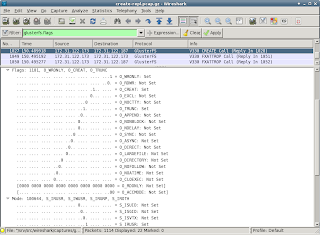
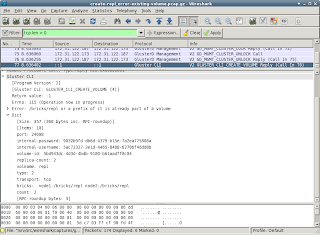
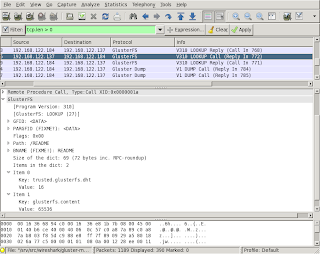
A lot of changes were committed recently to the gluster-wireshark repository. A lot of effort was put into the details (click on the image to enlarge):

  • UUIDs and GFIDs are now displayed as 4-2-2-2-6 bytes
  • flags for OPEN, CREATE etc are now shown in detail
  • mode/umask permissions are now shown in detail
  • dictionaries are displayed more user friendly
Most of the work was done so that the dissector files get in shape for (requesting) inclusion in upstream.

The full log is available, and so are updated RPMs for Fedora-16, Fedora-17 and EPEL-6. If installing a patched Wireshark isn't an option, you can build a wireshark-plugin-gluster easily with the steps in the provided README. On the project wiki, there are some pre-captured tcpdumps for consumption. Only a hand full of minor issues are know at this time, more reviewing and reporting is definitely welcome!

If you notice that some packets/frames are not displayed as Gluster, and you think they should, check gluster-wireshark wiki where is explained how to prevent PCEP and other protocols from claiming packers/frames.

Updated Wireshark packages for RHEL-6 and Fedora-17 available for testing

[From an email to the gluster-devel mailinglist]  today I have merged support for GlusterFS 3.2 and 3.3 into one Wireshark
'dissector'. The packages with date 20120516 in the version support both
the current stable 3.2.x version, and the latest 3.3.0qa41. Older 3.3.0
versions will likely have issues due to some changes in the RPC-AUTH
protocol used. Updating to the latest qa41 release (or newer) is
recommended anyway. I do not expect that we'll add support for earlier
3.3.0 releases.

My repository with packages for RHEL-6 and Fedora-17 contains a .repo
file for yum (save it in /etc/yum.repos.d):
- http://repos.fedorapeople.org/repos/devos/wireshark-gluster/

RPMs for other Fedora or RHEL versions can be provided on request. Let
me know if you need an other version (or architecture).

Single patches for some different Wireshark versions are available from
https://github.com/nixpanic/gluster-wireshark.

A full history of commits can be found here:
- https://github.com/nixpanic/gluster-wireshark-1.4/commits/master/
(Support for GlusterFS 3.3 was added by Akhila and Shree, thanks!)

Please test and report success and problems, file a issues on github:
https://github.com/nixpanic/gluster-wireshark-1.4/issues
Some functionality is still missing, but with the current status, it
should be good for most analysing already. With more issues filed, it
makes it easier to track what items are important.

Of course, you can also respond to this email and give feedback :-)

After some more cleanup of the code, this dissector will be passed on
for review and inclusion in the upstream Wireshark project. Some more
testing results is therefore much appreciated.

Improvements on displaying Gluster traffic with Wireshark

Slow but steadily I am improving the packet dissector for Gluster. Once it is in a more complete state, it'll be submitted for inclusion in Wireshark. Until that time (which will likely take some more months), updated versions of Wireshark for RHEL6 and F16 will occur on the Fedora People Repository at http://repos.fedorapeople.org/repos/devos/wireshark-gluster/.

The current packages can not only detect most of the Gluster traffic as explained in a previous post, but also display some of the more complex XDR structures used.

A screen shot of one example with Wireshark on Fedora 16:

Some of the captions in the display contain FIXME or similar notes. These are mainly reminders for myself, but also should be helpful for people trying the packages and suggesting improvements. Just by reading the Gluster sources, it is not always clear what the specific fields in the communication should be called in a user friendly way.

There is an open invite to improve the decoding done by the dissector. The code is (hopefully) easy to understand and should provide a low entry level. There are quite some notes in the code where it needs improvement (search for FIXME in the main .c file).

Coding is one thing, documenting the protocol is something that is closely related to the Wireshark dissector. How would reading traffic help, when you can not check if what you see is what should be happening? A start with documenting this can be found in my github repository which contains the latest sources.

Displaying Gluster traffic in Wireshark

As part of my job, I am doing some tests with the Red Hat Storage Software Appliance. The current version of RHSSA is based on Gluster 3.2.5. After some experiments, it seem that Gluster is pretty cool and surprisingly easy to setup.

In order to see what is going happening on the network, I captured some tcpdumps. Reading the files in Wireshark, does not show any Gluster specifics. It seems that Wireshark does not know how to decode (or rather dissect) the Gluster traffic. Very unfortunate, as quite some future troubleshooting and performance analysis may require investigating the network packets.

Luckily the Wireshark Developer's guide contains a chapter on Adding a basic dissector. After writing some code and tests, I now have some Wireshark packages that recognize some Gluster communication. The RPMs are available for testing, feedback over email is appreciated.

With the updated packages, the output of tshark (the terminal version of Wireshark) identifies some Gluster packets:
$ tshark -r gluster-communication.cap 'tcp.len > 0' | head
7 0.002572 192.168.122.184 -> 192.168.122.137 Gluster Dump V1 DUMP Call
8 0.002633 192.168.122.184 -> 192.168.122.137 Gluster Dump V1 DUMP Call
11 0.002909 192.168.122.137 -> 192.168.122.184 Gluster Dump V1 DUMP Reply (Call In 7)
12 0.002918 192.168.122.137 -> 192.168.122.184 Gluster Dump V1 DUMP Reply (Call In 8)
15 0.003104 192.168.122.184 -> 192.168.122.137 Gluster Portmap V1 PORTBYBRICK Call
16 0.003158 192.168.122.184 -> 192.168.122.137 Gluster Portmap V1 PORTBYBRICK Call
17 0.003298 192.168.122.137 -> 192.168.122.184 Gluster Portmap V1 PORTBYBRICK Reply (Call In 15)
18 0.003310 192.168.122.137 -> 192.168.122.184 Gluster Portmap V1 PORTBYBRICK Reply (Call In 16)
31 3.013909 192.168.122.184 -> 192.168.122.137 Gluster Dump V1 DUMP Call
32 3.013965 192.168.122.184 -> 192.168.122.137 PCEP Unknown Message (0).

As with several other protocols, Wireshark detects some packets as non-gluster ones. In this tcpdump, there surely is no PCEP traffic (last line in the above output). Each dissector for a protocol should do some sanity checks to see if a packet belongs to its protocol. These checks are not easy to do, and hence quite some protocols detect packets from Gluster as their communication stream.

Luckily it is possible to disable a protocol in the ~/.wireshark/disabled_protos file. Finding the correct names of a protocol isn't always straight forward. Use Wireshark to graphically create the file is the easiest, it also takes care of disabling the protocols that are possibly encapsulated. In Wireshark
  1. go to Analyze in the menu
  2. click "Enabled Protools"
  3. uncheck PCEP (and while you are at it, also uncheck SSL as it gives the same issues)

After these steps, tshark should recognize all traffic to and from port 24007 as belonging to one of the Gluster protocols. I have only tested the Wireshark dissectors on Gluster 3.2.5, later releases use some newer versions of some protocols and these may not be detected yet.