Nixpanic's Blog

Installing GlusterFS 3.4.x, 3.5.x or 3.6.0 on RHEL or CentOS 6.6

With the release of RHEL-6.6 and CentOS-6.6, there are now glusterfs packages in the standard channels/repositories. Unfortunately, these are only the client-side packages (like glusterfs-fuse and glusterfs-api). Users that want to run a Gluster Server on a current RHEL or CentOS now have difficulties installing any of todays current version of the Gluster Community packages.

The most prominent issue is that the glusterfs package from RHEL has a version of 3.6.0.28, and that is higher than the last week released version of 3.6.0. RHEL is shipping a pre-release that was created while the Gluster Community was still developing 3.6. An unfortunate packaging decision added a .28 to the version, where most other pre-releases would fall-back to a (rpm-)version like 3.6.0-0.1.something.bla.el6. The difference might look minor, but the result is a major disruption in the much anticipated 3.6 community release.


Change the default search engine in Epiphany, the GNOME Web application

When I'm enjoying the sun/wind/rain on the balcony, I tend to use my XO-1.75 for duties where most people would use a tablet. Reading/writing emails, browsing the internet, bug triaging or writing small fixes, release notes and all can be done fine on a small screen. My preference goes definitely towards physical keyboards, and less to their onscreen variants. Even when the keyboard is small, I like the typing on it much more than using a touchscreen for it. Of course, the space saving of not needing to display a keyboard helps too. But well, that aside...


Configuring autofs for GlusterFS 3.5

GlusterFS 3.5 has not been released yet, but that should happen hopefully anytime soon (currently in beta). The RPM-packaging in this version has changed a little, and now offers a glusterfs-cli package. This package mainly contains the gluster commandline interface (and pulls in any dependencies).

On of the very useful things that is now made possible, is to list the available volumes on Gluster Storge Servers. This similar functionality is used by the /etc/auto.net script to list NFS-exports that are available for mounting. The auto.net script is by default enabled after installing and starting autofs:


Setting up a test-environment for Apache CloudStack and Gluster

This is an example of how to configure an environment where you can test CloudStack and Gluster. It uses two machines on the same LAN, one acts as a KVM hypervisor and the other as storage and management server. Because the (virtual) networking in the hypervisor is a little more complex than the networking on the management server, the hypervisor will be setup with an OpenVPN connection so that the local LAN is not affected with 'foreign' network traffic.


Fedora 18 Remix for Genesi EFIKA MX Smartbook available

After quite some delay, I have been able to try out a work-in-progress kernel-tree (3.7) from Sascha Hauer for the Genesi EFIKA MX Smartbook. The Fedora Remix image I have created uses the barebox bootloader to load the device-tree and the kernel (a zImage with concatenated initramfs).

The contents of the image is based on the Fedora 18 Generic Root Filesystem armhfp. XFCE and most of the desktop basics are included. Very little changes were needed over all. As the Smartbook has only 512MB of RAM, it is recommended to add some swap space, re-using the swap on the internal HD works for me (you need to update your /etc/fstab).


Configuring a bluetooth keyboard system-wide from the command line

Recently I bought a new keyboard, which I intend to use when my laptop is placed in its docking station. There are two external monitors connected, making the display of the laptop rather useless (only two outputs are supported at the same time). In normal circumstances the laptop lid will be closed, so the keyboard is not accessible.

My new keyboard is a Logitech K760 and is connected through bluetooth. Pairing with help from the the XFCE/GNOME tools is easy enough, but this causes the keyboard to be available after login only. That is not very practical. After boot, I have to login through GDM and prefer to not need to use the keyboard of the laptop itself. For this, I needed to figure out how to make the bluetooth keyboard available on system level, and not per user. Descriptions on how to do this seem to be very sparse, and mostly depend on other distributions than RHEL or Fedora. I prefer to use standard tools as much as possible, adding custom scripts for these things makes it more difficult to move configurations between systems. Furthermore the keyboard can be paired to multiple (3) systems at the same time, the F1-3 keys can be used to select a system, similar to a KVM switch.


Use dnsmasq for separating DNS queries

Automatic network configuration with DHCP is great. But if you need to use multiple separated networks at once, it gets more difficult pretty quickly. For example, my RHEL-6 laptop

  1. connects through wifi to the network at home, which provides internet access
  2. accesses remote systems connected via a VPN
  3. and manages virtual machines that need access to any of those

Now, when NetworkManager connects to the VPN, the DNS-servers for the VPN are added to /etc/resolv.conf with a higher priority than the home network one. This is fine in a lot of circumstances, but that means all domain name
service lookups will go through the VPN first. That's not optimal, and the administrator of the VPN does not need to see all the hostname lookups my laptop is doing either. Also, any lookups for the local network will go through
the VPN, fail there and are retried with the next DNS-server, making queries for the LAN slower than all the others.

The solution sounds simple: Only use the DNS-servers on the VPN for lookups for resources that are on the VPN.

Unfortunately, the configuration is not that simple if it needs to work dynamically. The main configuration file that contains DNS-servers (/etc/resolv.conf) does not have any options to tell that some DNS-servers are to be used for certain domains only. A workaround for this limitation is to use a DNS-server that supports filtering and relaying queries, and have it listen on localhost. This DNS-server is configured in /etc/resolv.conf, and any new network configurations (or removed ones) should not change the configuration in /etc/resolv.conf, but the local DNS-server instead.

This means that my /etc/resolv.conf looks like this:
nameserver 127.0.0.1
search lan.example.net

The minimal /etc/resolv.conf file is also saved as
/etc/resolv.conf.dnsmasq, which is used as a template for restoring the configuration when a VPN service (like OpenVPN) modified it.

The DNS-server for this setup became dnsmasq. This piece of software was already installed on my laptop as a dependency of libvirt, and offers the simple configuration that this setup can benefit from. For this setup, the
libvirt configuration of dnsmasq is not touched, it works fine and with its integrated DHCP-server I am not tempted to break my virtual machines (not now, and not when I install updates).

The configuration to let dnsmasq listen on localhost, and not intervene with libvirt that listens on virbr0 is very minimal as well. My preference is to prevent big changes in packaged configuration files as these may become difficult to merge with updates, so the only change in /etc/dnsmasq.conf that is required is this (newer versions seem to have this by default):
# Include a another lot of configuration options.
#conf-file=/etc/dnsmasq.more.conf
conf-dir=/etc/dnsmasq.d

An additional file in the /etc/dnsmasq.d directory suffices,  /etc/dnsmasq.d/localhost.conf:
no-resolv
no-poll
interface=lo
no-dhcp-interface=lo
bind-interfaces

The default configuration file /etc/dnsmasq.conf contains a good description of these options. It is not needed to repeat them here.

Enabling dnsmasq to start at boot is a prerequisite, otherwise any lookup that uses DNS-servers will fail completely. On my RHEL-6 system, I needed to enable starting of dnsmasq with /sbin/chkconfig dnsmasq on, start
the service with /sbin/service dnsmasq start.

With this current configuration, only hostnames and IP-addresses that are in /etc/hosts are being resolved. Which means, it is difficult to create any network connections outside of the laptop. The next step is to integrate the available connected networks with the dnsmasq configuration.

NetworkManager is used to configure the network on my laptop. This is convenient as it supports WLAN and can connect to the VPN. In order to teach it to write a dnsmasq configuration file for each network that gets setup, I used
an event script, /etc/NetworkManager/dispatcher.d/90-update-resolv.conf:
#!/bin/sh
#
# NetworkManager dispatcher script to prevent messing with DNS servers in the
# LAN.
#
# Author: Niels de Vos
#

DNSMASQ_RESOLV=/etc/dnsmasq.d/resolv-${CONNECTION_UUID}.conf

function write_dnsmasq_header
{
if [ ! -e ${DNSMASQ_RESOLV} ]
then
echo "# ${DNSMASQ_RESOLV} generated on $(date)" > ${DNSMASQ_RESOLV}
echo "# Generator: ${0}" >> ${DNSMASQ_RESOLV}
echo "# Connection: ${CONNECTION_UUID}" >> ${DNSMASQ_RESOLV}
fi
}

function create_dnsmasq_config_env
{
local NS

write_dnsmasq_header

for NS in ${IP4_NAMESERVERS}
do
echo "server=${NS}" >> ${DNSMASQ_RESOLV}
done
}

function create_dnsmasq_config_from_resolv_conf
{
local NS
local DOMAIN=""

write_dnsmasq_header

DOMAIN=$(awk '/^domain/ {print $2}' /etc/resolv.conf)
[ -n "${DOMAIN}" ] && DOMAIN="/${DOMAIN}/"

for NS in $(awk '/^nameserver/ {print $2}' /etc/resolv.conf)
do
# make sure the NS is not from an other config
grep -q "[=/]${NS}\$" /etc/dnsmasq.d/resolv-*.conf && continue

echo "server=${DOMAIN}${NS}" >> ${DNSMASQ_RESOLV}
done
}

function remove_dnsmasq_config
{
rm -f ${DNSMASQ_RESOLV}
}

function remove_stale_configs
{
local CONF
local UUID

for CONF in /etc/dnsmasq.d/resolv-*.conf
do
# in case of a wildcard error
[ -e "${CONF}" ] || continue

UUID=$(awk '/^# Connection: / {print $3}' ${CONF})
if ! ( nmcli -t -f UUID con status | grep -q "^${UUID}\$" )
then
rm -f ${CONF}
fi
done
}

function reload_dnsmasq
{
cat /etc/resolv.conf.dnsmasq > /etc/resolv.conf
[ -n "${DHCP4_DOMAIN_SEARCH}" ] && echo "search ${DHCP4_DOMAIN_SEARCH}" >> /etc/resolv.conf
# "killall -HUP dnsmasq" is not sufficient for new files
/sbin/service dnsmasq restart 2>&1 > /dev/null
}

case "$2" in
"up")
remove_stale_configs
create_dnsmasq_config_env
reload_dnsmasq
;;
"vpn-up")
remove_stale_configs
create_dnsmasq_config_from_resolv_conf
reload_dnsmasq
;;
"down")
remove_stale_configs
remove_dnsmasq_config
reload_dnsmasq
;;
"vpn-down")
remove_stale_configs
remove_dnsmasq_config
reload_dnsmasq
;;
esac

This script will write a configuration file like /etc/dnsmasq.d/resolv-0263cda6-edbd-437e-8d36-efb86dcc9112.conf:
# /etc/dnsmasq.d/resolv-0263cda6-edbd-437e-8d36-efb86dcc9112.conf generated on Sun Mar 17 11:57:26 CET 2013
# Generator: /etc/NetworkManager/dispatcher.d/90-update-resolv.conf
# Connection: 0263cda6-edbd-437e-8d36-efb86dcc9112
server=192.168.0.1

The generated configuration file for dnsmasq simply states that there is a DNS-server on 192.168.0.1, which can be used for any query. When the configuration has been written, the dnsmasq daemon is sent a SIGHUP which causes it to reload its configuraion files.

After connecting to a VPN, an other partial configuration file is generated. In this case /etc/dnsmasq.d/resolv-ba76186a-9923-4756-aa8a-19706a4d273c.conf:
# /etc/dnsmasq.d/resolv-ba76186a-9923-4756-aa8a-19706a4d273c.conf generated on Sun Mar 17 11:57:41 CET 2013
# Generator: /etc/NetworkManager/dispatcher.d/90-update-resolv.conf
# Connection: ba76186a-9923-4756-aa8a-19706a4d273c
server=/example.com/10.0.0.1
server=/example.com/10.0.0.2

Similar to the main WLAN connection, this configuration contains two DNS-servers, but these are to be used for the example.com network only.

For me this works in the environments I visit, wifi at home, network cable connected docking station, and several other (non-)public wireless networks.

Changing vim settings depending on the git repository containing the file

Not all projects I am regularly working on use the same CodingStyle. This is very unfortunate, and sometimes makes it time consuming to provide acceptable patches. One common example is that some project indent with a <tab>, where others expect <4-spaces>.

I could not find a vim plugin or other extension that lets me pick vim-settings per git repository. The idea that I came up with, is to set the project specific vim-settings in the git-config itself. For example:

$ git config --add vim.settings 'tabstop=4 expandtab'
Now, in my ~/.vimrc, I have the following snippet:

let git_settings = system("git config --get vim.settings")
if strlen(git_settings)
exe "set" git_settings
endif

Editing a file in the git repository that contains the above vim.settings, now replaces my <tab> by <4-spaces>. Other repositories that do not have the vim.settings will fall-back to my vim defaults. If you can think of any improvements or suggestions, please share them.

Wireshark 1.8.x included in the upcoming Fedora 18

It seems that the maintainer of the wireshark package in Fedora has updated to version 1.8.1 in the current Fedora Rawhide, which will become Fedora 18. The schedule tells us that Fedora 18 is planned to be released on 2012-11-06 (the latest schedule may have an updated date).

This is good news for the Gluster Community (and support engineers like me), as Wireshark 1.8 contains support for most of the Gluster protocols:
Comments on the support in Wireshark are much appreciated, send them to gluster-devel@nongnu.org, file an issue in my development repository or in the Wireshark Bugzilla.

Gluster support for Wireshark is maturing!

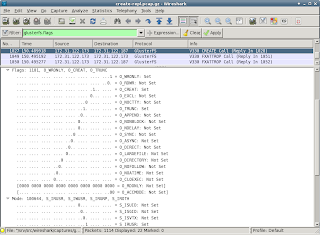
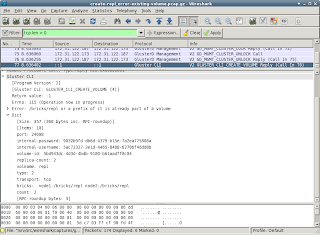
A lot of changes were committed recently to the gluster-wireshark repository. A lot of effort was put into the details (click on the image to enlarge):

  • UUIDs and GFIDs are now displayed as 4-2-2-2-6 bytes
  • flags for OPEN, CREATE etc are now shown in detail
  • mode/umask permissions are now shown in detail
  • dictionaries are displayed more user friendly
Most of the work was done so that the dissector files get in shape for (requesting) inclusion in upstream.

The full log is available, and so are updated RPMs for Fedora-16, Fedora-17 and EPEL-6. If installing a patched Wireshark isn't an option, you can build a wireshark-plugin-gluster easily with the steps in the provided README. On the project wiki, there are some pre-captured tcpdumps for consumption. Only a hand full of minor issues are know at this time, more reviewing and reporting is definitely welcome!

If you notice that some packets/frames are not displayed as Gluster, and you think they should, check gluster-wireshark wiki where is explained how to prevent PCEP and other protocols from claiming packers/frames.