Nixpanic's Blog

Automatically subscribe RHEL systems for receiving updates and installing more packages

While fixing bugs and testing patches, I often use virtual machines running RHEL. These systems are short living, and normally do not survive a day or two. For most tests and development tries, I have little need to install additional packages or updates. An installation from the DVD contains all that is needed. Mostly...

To install additional packages or updates, it is needed to register the system to the Red Hat Customer Portal. The subscription-manager tool that is installed on all current RHEL systems can be used for that. For simple usage of the utility, a username and password is sufficient. Automating the subscribing process would require saving those credentials in a kickstart or ansible configuration, that's not what I want. Manually subscribing the VM when I need to was the annoying workaround.


Configured Zabbix to keep my server cool

Recently I got myself an APC NetShelterCX mini. It is a 12U rack, with integrated fans for cooling. At the moment it is populated with some ARM boards (not rack mounted), their PDUs, a switch and (for now) one 2U server.

Surprisingly, the fans of the NetShelter are louder than the server (the rest does not have fans at all, except for the switch). But, it is not an option to keep the fans turned off all the time. When the server is idle, its CPUs temperature stays somewhere between 40-50 Celsius. However, when starting several virtual machines for testing some Gluster changes, the temperature rises steadily. To prevent overheating, the fans of the cabinet need to be turned on.


Installing GlusterFS 3.4.x, 3.5.x or 3.6.0 on RHEL or CentOS 6.6

With the release of RHEL-6.6 and CentOS-6.6, there are now glusterfs packages in the standard channels/repositories. Unfortunately, these are only the client-side packages (like glusterfs-fuse and glusterfs-api). Users that want to run a Gluster Server on a current RHEL or CentOS now have difficulties installing any of todays current version of the Gluster Community packages.

The most prominent issue is that the glusterfs package from RHEL has a version of 3.6.0.28, and that is higher than the last week released version of 3.6.0. RHEL is shipping a pre-release that was created while the Gluster Community was still developing 3.6. An unfortunate packaging decision added a .28 to the version, where most other pre-releases would fall-back to a (rpm-)version like 3.6.0-0.1.something.bla.el6. The difference might look minor, but the result is a major disruption in the much anticipated 3.6 community release.


Configuring a bluetooth keyboard system-wide from the command line

Recently I bought a new keyboard, which I intend to use when my laptop is placed in its docking station. There are two external monitors connected, making the display of the laptop rather useless (only two outputs are supported at the same time). In normal circumstances the laptop lid will be closed, so the keyboard is not accessible.

My new keyboard is a Logitech K760 and is connected through bluetooth. Pairing with help from the the XFCE/GNOME tools is easy enough, but this causes the keyboard to be available after login only. That is not very practical. After boot, I have to login through GDM and prefer to not need to use the keyboard of the laptop itself. For this, I needed to figure out how to make the bluetooth keyboard available on system level, and not per user. Descriptions on how to do this seem to be very sparse, and mostly depend on other distributions than RHEL or Fedora. I prefer to use standard tools as much as possible, adding custom scripts for these things makes it more difficult to move configurations between systems. Furthermore the keyboard can be paired to multiple (3) systems at the same time, the F1-3 keys can be used to select a system, similar to a KVM switch.


Use dnsmasq for separating DNS queries

Automatic network configuration with DHCP is great. But if you need to use multiple separated networks at once, it gets more difficult pretty quickly. For example, my RHEL-6 laptop

  1. connects through wifi to the network at home, which provides internet access
  2. accesses remote systems connected via a VPN
  3. and manages virtual machines that need access to any of those

Now, when NetworkManager connects to the VPN, the DNS-servers for the VPN are added to /etc/resolv.conf with a higher priority than the home network one. This is fine in a lot of circumstances, but that means all domain name
service lookups will go through the VPN first. That's not optimal, and the administrator of the VPN does not need to see all the hostname lookups my laptop is doing either. Also, any lookups for the local network will go through
the VPN, fail there and are retried with the next DNS-server, making queries for the LAN slower than all the others.

The solution sounds simple: Only use the DNS-servers on the VPN for lookups for resources that are on the VPN.

Unfortunately, the configuration is not that simple if it needs to work dynamically. The main configuration file that contains DNS-servers (/etc/resolv.conf) does not have any options to tell that some DNS-servers are to be used for certain domains only. A workaround for this limitation is to use a DNS-server that supports filtering and relaying queries, and have it listen on localhost. This DNS-server is configured in /etc/resolv.conf, and any new network configurations (or removed ones) should not change the configuration in /etc/resolv.conf, but the local DNS-server instead.

This means that my /etc/resolv.conf looks like this:
nameserver 127.0.0.1
search lan.example.net

The minimal /etc/resolv.conf file is also saved as
/etc/resolv.conf.dnsmasq, which is used as a template for restoring the configuration when a VPN service (like OpenVPN) modified it.

The DNS-server for this setup became dnsmasq. This piece of software was already installed on my laptop as a dependency of libvirt, and offers the simple configuration that this setup can benefit from. For this setup, the
libvirt configuration of dnsmasq is not touched, it works fine and with its integrated DHCP-server I am not tempted to break my virtual machines (not now, and not when I install updates).

The configuration to let dnsmasq listen on localhost, and not intervene with libvirt that listens on virbr0 is very minimal as well. My preference is to prevent big changes in packaged configuration files as these may become difficult to merge with updates, so the only change in /etc/dnsmasq.conf that is required is this (newer versions seem to have this by default):
# Include a another lot of configuration options.
#conf-file=/etc/dnsmasq.more.conf
conf-dir=/etc/dnsmasq.d

An additional file in the /etc/dnsmasq.d directory suffices,  /etc/dnsmasq.d/localhost.conf:
no-resolv
no-poll
interface=lo
no-dhcp-interface=lo
bind-interfaces

The default configuration file /etc/dnsmasq.conf contains a good description of these options. It is not needed to repeat them here.

Enabling dnsmasq to start at boot is a prerequisite, otherwise any lookup that uses DNS-servers will fail completely. On my RHEL-6 system, I needed to enable starting of dnsmasq with /sbin/chkconfig dnsmasq on, start
the service with /sbin/service dnsmasq start.

With this current configuration, only hostnames and IP-addresses that are in /etc/hosts are being resolved. Which means, it is difficult to create any network connections outside of the laptop. The next step is to integrate the available connected networks with the dnsmasq configuration.

NetworkManager is used to configure the network on my laptop. This is convenient as it supports WLAN and can connect to the VPN. In order to teach it to write a dnsmasq configuration file for each network that gets setup, I used
an event script, /etc/NetworkManager/dispatcher.d/90-update-resolv.conf:
#!/bin/sh
#
# NetworkManager dispatcher script to prevent messing with DNS servers in the
# LAN.
#
# Author: Niels de Vos
#

DNSMASQ_RESOLV=/etc/dnsmasq.d/resolv-${CONNECTION_UUID}.conf

function write_dnsmasq_header
{
if [ ! -e ${DNSMASQ_RESOLV} ]
then
echo "# ${DNSMASQ_RESOLV} generated on $(date)" > ${DNSMASQ_RESOLV}
echo "# Generator: ${0}" >> ${DNSMASQ_RESOLV}
echo "# Connection: ${CONNECTION_UUID}" >> ${DNSMASQ_RESOLV}
fi
}

function create_dnsmasq_config_env
{
local NS

write_dnsmasq_header

for NS in ${IP4_NAMESERVERS}
do
echo "server=${NS}" >> ${DNSMASQ_RESOLV}
done
}

function create_dnsmasq_config_from_resolv_conf
{
local NS
local DOMAIN=""

write_dnsmasq_header

DOMAIN=$(awk '/^domain/ {print $2}' /etc/resolv.conf)
[ -n "${DOMAIN}" ] && DOMAIN="/${DOMAIN}/"

for NS in $(awk '/^nameserver/ {print $2}' /etc/resolv.conf)
do
# make sure the NS is not from an other config
grep -q "[=/]${NS}\$" /etc/dnsmasq.d/resolv-*.conf && continue

echo "server=${DOMAIN}${NS}" >> ${DNSMASQ_RESOLV}
done
}

function remove_dnsmasq_config
{
rm -f ${DNSMASQ_RESOLV}
}

function remove_stale_configs
{
local CONF
local UUID

for CONF in /etc/dnsmasq.d/resolv-*.conf
do
# in case of a wildcard error
[ -e "${CONF}" ] || continue

UUID=$(awk '/^# Connection: / {print $3}' ${CONF})
if ! ( nmcli -t -f UUID con status | grep -q "^${UUID}\$" )
then
rm -f ${CONF}
fi
done
}

function reload_dnsmasq
{
cat /etc/resolv.conf.dnsmasq > /etc/resolv.conf
[ -n "${DHCP4_DOMAIN_SEARCH}" ] && echo "search ${DHCP4_DOMAIN_SEARCH}" >> /etc/resolv.conf
# "killall -HUP dnsmasq" is not sufficient for new files
/sbin/service dnsmasq restart 2>&1 > /dev/null
}

case "$2" in
"up")
remove_stale_configs
create_dnsmasq_config_env
reload_dnsmasq
;;
"vpn-up")
remove_stale_configs
create_dnsmasq_config_from_resolv_conf
reload_dnsmasq
;;
"down")
remove_stale_configs
remove_dnsmasq_config
reload_dnsmasq
;;
"vpn-down")
remove_stale_configs
remove_dnsmasq_config
reload_dnsmasq
;;
esac

This script will write a configuration file like /etc/dnsmasq.d/resolv-0263cda6-edbd-437e-8d36-efb86dcc9112.conf:
# /etc/dnsmasq.d/resolv-0263cda6-edbd-437e-8d36-efb86dcc9112.conf generated on Sun Mar 17 11:57:26 CET 2013
# Generator: /etc/NetworkManager/dispatcher.d/90-update-resolv.conf
# Connection: 0263cda6-edbd-437e-8d36-efb86dcc9112
server=192.168.0.1

The generated configuration file for dnsmasq simply states that there is a DNS-server on 192.168.0.1, which can be used for any query. When the configuration has been written, the dnsmasq daemon is sent a SIGHUP which causes it to reload its configuraion files.

After connecting to a VPN, an other partial configuration file is generated. In this case /etc/dnsmasq.d/resolv-ba76186a-9923-4756-aa8a-19706a4d273c.conf:
# /etc/dnsmasq.d/resolv-ba76186a-9923-4756-aa8a-19706a4d273c.conf generated on Sun Mar 17 11:57:41 CET 2013
# Generator: /etc/NetworkManager/dispatcher.d/90-update-resolv.conf
# Connection: ba76186a-9923-4756-aa8a-19706a4d273c
server=/example.com/10.0.0.1
server=/example.com/10.0.0.2

Similar to the main WLAN connection, this configuration contains two DNS-servers, but these are to be used for the example.com network only.

For me this works in the environments I visit, wifi at home, network cable connected docking station, and several other (non-)public wireless networks.

Updated Wireshark packages for RHEL-6 and Fedora-17 available for testing

[From an email to the gluster-devel mailinglist]  today I have merged support for GlusterFS 3.2 and 3.3 into one Wireshark
'dissector'. The packages with date 20120516 in the version support both
the current stable 3.2.x version, and the latest 3.3.0qa41. Older 3.3.0
versions will likely have issues due to some changes in the RPC-AUTH
protocol used. Updating to the latest qa41 release (or newer) is
recommended anyway. I do not expect that we'll add support for earlier
3.3.0 releases.

My repository with packages for RHEL-6 and Fedora-17 contains a .repo
file for yum (save it in /etc/yum.repos.d):
- http://repos.fedorapeople.org/repos/devos/wireshark-gluster/

RPMs for other Fedora or RHEL versions can be provided on request. Let
me know if you need an other version (or architecture).

Single patches for some different Wireshark versions are available from
https://github.com/nixpanic/gluster-wireshark.

A full history of commits can be found here:
- https://github.com/nixpanic/gluster-wireshark-1.4/commits/master/
(Support for GlusterFS 3.3 was added by Akhila and Shree, thanks!)

Please test and report success and problems, file a issues on github:
https://github.com/nixpanic/gluster-wireshark-1.4/issues
Some functionality is still missing, but with the current status, it
should be good for most analysing already. With more issues filed, it
makes it easier to track what items are important.

Of course, you can also respond to this email and give feedback :-)

After some more cleanup of the code, this dissector will be passed on
for review and inclusion in the upstream Wireshark project. Some more
testing results is therefore much appreciated.

Improvements on displaying Gluster traffic with Wireshark

Slow but steadily I am improving the packet dissector for Gluster. Once it is in a more complete state, it'll be submitted for inclusion in Wireshark. Until that time (which will likely take some more months), updated versions of Wireshark for RHEL6 and F16 will occur on the Fedora People Repository at http://repos.fedorapeople.org/repos/devos/wireshark-gluster/.

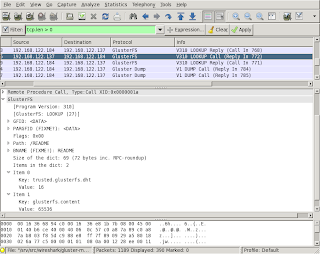
The current packages can not only detect most of the Gluster traffic as explained in a previous post, but also display some of the more complex XDR structures used.

A screen shot of one example with Wireshark on Fedora 16:

Some of the captions in the display contain FIXME or similar notes. These are mainly reminders for myself, but also should be helpful for people trying the packages and suggesting improvements. Just by reading the Gluster sources, it is not always clear what the specific fields in the communication should be called in a user friendly way.

There is an open invite to improve the decoding done by the dissector. The code is (hopefully) easy to understand and should provide a low entry level. There are quite some notes in the code where it needs improvement (search for FIXME in the main .c file).

Coding is one thing, documenting the protocol is something that is closely related to the Wireshark dissector. How would reading traffic help, when you can not check if what you see is what should be happening? A start with documenting this can be found in my github repository which contains the latest sources.

Unexpected requirements for creating a video DVD with Brasero

With the current standard of mobiles and photo cameras that can be used to film things, it would be fun to create a little video. It seems that Brasero is a standard tool for the GNOME desktop, which should work without issues in my preferred XFCE as well. Brasero (and seemingly all of its dependencies) is even included in the Red Hat Enterprise Linux 6.2 Workstation repository/channel.

Unfortunately, after creating a video project in Brasero, a little warning gets displayed:
It is not possible to write with the current set of plugins.
There is the need for a more detailed look into how Brasero does the detection/loading of plugins. In the search for more verbosity from the command-line, I found that the command
brasero --help shows that there is a --help-brasero-burn option. Giving that a try, dumps an immense list of things on the console. This includes the following:

  • ffmpeg_mpeg2video is missing
    (brasero:19298): BraseroBurn-DEBUG: At burn-plugin-manager.c:452: loading /usr/lib64/brasero/plugins/libbrasero-vob.so
    (brasero:19298): BraseroBurn-DEBUG: At burn-plugin.c:1041: Module encountered an error while registering its capabilities:
    "ffenc_mpeg2video" element could not be created
    (brasero:19298): BraseroBurn-DEBUG: At burn-plugin-manager.c:481: Load failure, no GType was returned "ffenc_mpeg2video" element could not be created
  • libdvdcss is missing
    (brasero:19298): BraseroBurn-DEBUG: At burn-plugin-manager.c:452: loading /usr/lib64/brasero/plugins/libbrasero-dvdcss.so
    (brasero:19298): BraseroBurn-DEBUG: At burn-plugin.c:1041: Module encountered an error while registering its capabilities:
    Encrypted DVD: please install libdvdcss version 1.2.x
    (brasero:19298): BraseroBurn-DEBUG: At burn-plugin-manager.c:481: Load failure, no GType was returned Encrypted DVD: please install libdvdcss version 1.2.x
  • dvdauthor is missing
    (brasero:19298): BraseroBurn-DEBUG: At burn-plugin-manager.c:452: loading /usr/lib64/brasero/plugins/libbrasero-dvdauthor.so
    (brasero:19298): BraseroBurn-DEBUG: At burn-plugin.c:1041: Module encountered an error while registering its capabilities:
    "dvdauthor" could not be found in the path
    (brasero:19298): BraseroBurn-DEBUG: At burn-plugin-manager.c:481: Load failure, no GType was returned "dvdauthor" could not be found in the path
  • vcdimager is missing
    (brasero:19298): BraseroBurn-DEBUG: At burn-plugin-manager.c:452: loading /usr/lib64/brasero/plugins/libbrasero-vcdimager.so
    (brasero:19298): BraseroBurn-DEBUG: At burn-plugin.c:1041: Module encountered an error while registering its capabilities:
    "vcdimager" could not be found in the path
    (brasero:19298): BraseroBurn-DEBUG: At burn-plugin-manager.c:481: Load failure, no GType was returned "vcdimager" could not be found in the path

After some googling, it seems that these packages are made available for RHEL6 in Repoforge (previously RPMForge). The additional packages that need to get installed (first pass):
  • gstreamer-ffmpeg
  • libdvdcss
  • dvdauthor
  • vcdimager

Getting closer, but not completely there yet, as brasero --brasero-burn-debug still misses something:
(brasero:19508): BraseroBurn-DEBUG: At burn-plugin-manager.c:452: loading /usr/lib64/brasero/plugins/libbrasero-vob.so
(brasero:19508): BraseroBurn-DEBUG: At burn-plugin.c:1041: Module encountered an error while registering its capabilities:
"mplex" element could not be created
(brasero:19508): BraseroBurn-DEBUG: At burn-plugin-manager.c:481: Load failure, no GType was returned "mplex" element could not be created

Knowing that Brasero uses the GStreamer framework, it seems logical to try to install a GStream plugin called mplex. All GStreamer plugins seem to be located in /usr/lib64/gstreamer-0.10, and installing the mplex plugin with yum seems to work:
# yum install /usr/lib64/gstreamer-0.10/libgstmplex.so
Loaded plugins: refresh-packagekit, rhnplugin
Setting up Install Process
...
Resolving Dependencies
--> Running transaction check
---> Package gstreamer-plugins-bad.x86_64 0:0.10.19-3.el6.rf will be installed
--> Processing Dependency: libxvidcore.so.4()(64bit) for package: gstreamer-plugins-bad-0.10.19-3.el6.rf.x86_64
--> Processing Dependency: libmms.so.0()(64bit) for package: gstreamer-plugins-bad-0.10.19-3.el6.rf.x86_64
--> Processing Dependency: libmusicbrainz.so.4()(64bit) for package: gstreamer-plugins-bad-0.10.19-3.el6.rf.x86_64
--> Processing Dependency: libamrwb.so.3()(64bit) for package: gstreamer-plugins-bad-0.10.19-3.el6.rf.x86_64
--> Processing Dependency: libcdaudio.so.1()(64bit) for package: gstreamer-plugins-bad-0.10.19-3.el6.rf.x86_64
--> Running transaction check
---> Package amrwb.x86_64 0:7.0.0.3-1.el6.rf will be installed
---> Package libcdaudio.x86_64 0:0.99.12p2-13.el6 will be installed
---> Package libmms.x86_64 0:0.5-1.el6.rf will be installed
---> Package libmusicbrainz.x86_64 0:2.1.5-11.1.el6 will be installed
---> Package xvidcore.x86_64 0:1.2.2-1.el6.rf will be installed
--> Finished Dependency Resolution

Dependencies Resolved

========================================================================================================================================================================
Package Arch Version Repository Size
========================================================================================================================================================================
Installing:
gstreamer-plugins-bad x86_64 0.10.19-3.el6.rf rpmforge 1.2 M
Installing for dependencies:
amrwb x86_64 7.0.0.3-1.el6.rf rpmforge 180 k
libcdaudio x86_64 0.99.12p2-13.el6 epel 39 k
libmms x86_64 0.5-1.el6.rf rpmforge 60 k
libmusicbrainz x86_64 2.1.5-11.1.el6 rhel-x86_64-workstation-6 88 k
xvidcore x86_64 1.2.2-1.el6.rf rpmforge 555 k

Transaction Summary
========================================================================================================================================================================
Install 6 Package(s)

Total download size: 2.1 M
Installed size: 7.4 M
Is this ok [y/N]: y
Downloading Packages:
...
Running rpm_check_debug
Running Transaction Test
Transaction Test Succeeded
Running Transaction
Installing : libcdaudio-0.99.12p2-13.el6.x86_64 1/6
Installing : libmms-0.5-1.el6.rf.x86_64 2/6
Installing : amrwb-7.0.0.3-1.el6.rf.x86_64 3/6
Installing : libmusicbrainz-2.1.5-11.1.el6.x86_64 4/6
Installing : xvidcore-1.2.2-1.el6.rf.x86_64 5/6
Installing : gstreamer-plugins-bad-0.10.19-3.el6.rf.x86_64 6/6

Installed:
gstreamer-plugins-bad.x86_64 0:0.10.19-3.el6.rf

Dependency Installed:
amrwb.x86_64 0:7.0.0.3-1.el6.rf libcdaudio.x86_64 0:0.99.12p2-13.el6 libmms.x86_64 0:0.5-1.el6.rf libmusicbrainz.x86_64 0:2.1.5-11.1.el6
xvidcore.x86_64 0:1.2.2-1.el6.rf

Complete!

This whole troubleshooting took quite a while, and I do not know if all the new packages are really needed, or if a subset is sufficient. Glad it's over, working and documented for a next time too (and possibly others).

Archivemount is now in EPEL6

The only (for now) package I maintain, archivemount is now available in EPEL6 too. It has been in Fedora 14 for a while now, EPEL5 is following when libarchive is ready.

For those who have no idea what archivemount is:
Archivemount is a piece of glue code between libarchive and FUSE. It can be used to mount a (possibly compressed) archive (as in .tar.gz or .tar.bz2) and use it like an ordinary filesystem.

Creating a bootable USB-stick

This is a short explanation on how to create a bootable USB-stick with GRUB. This stick can be used to boot an installer, rescue-mode or an on-stick installed Linux distribution.

I mainly use my USB-stick to install different versions (and architectures) of RHEL. Booting from this USB-stick and starting and starting a kickstart installation is really convenient.

Detect the USB-stick

This is a very important step and the one where most attention is needed. Detecting the device-node where the USB-stick is connected should not go wrong. Picking the wrong drive will not make your system unbootable (as we're creating a bootable disk), but all data will be lost!

To detect which device-node is used for the USB-stick, I tend to check the output from the command 'dmesg'. This commmand displays the contents of the kernel-log-buffer and the last lines contain the last events. Insert the USB-stick and shortly after that checking 'dmesg', results for me in the following output (truncated here, only the last importan messages are shown):
usb 1-2: new high speed USB device using ehci_hcd and address 5
usb 1-2: New USB device found, idVendor=1e3d, idProduct=2093
usb 1-2: New USB device strings: Mfr=1, Product=2, SerialNumber=3
usb 1-2: Product:
usb 1-2: Manufacturer: USB 2.0
usb 1-2: SerialNumber: 26073604A307E205
usb 1-2: configuration #1 chosen from 1 choice
scsi4 : SCSI emulation for USB Mass Storage devices
usb-storage: device found at 5
usb-storage: waiting for device to settle before scanning
usb-storage: device scan complete
scsi 4:0:0:0: Direct-Access USB 2.0 5.00 PQ: 0 ANSI: 2
sd 4:0:0:0: Attached scsi generic sg2 type 0
sd 4:0:0:0: [sdc] 4067328 512-byte logical blocks: (2.08 GB/1.93 GiB)
sd 4:0:0:0: [sdc] Write Protect is off
sd 4:0:0:0: [sdc] Mode Sense: 0b 00 00 08
sd 4:0:0:0: [sdc] Assuming drive cache: write through
sdc: sdc1 sdc2
The USB-stick just connected is called 'sdc' and obviously contiains two partitions: sdc1 and sdc2. The matching device-node for this USB-stick is '/dev/sdc'.

Prtitioning the USB-stick

There exist a lot of tools to perform partitioning of a disk. One of the most common tools is 'fdisk' and that is very esy to use, therefore I mostly use this tool too.

'fdisk' takes the device-node as parameter, starting 'fdisk' looks like this:
# fdisk /dev/sdc

The number of cylinders for this disk is set to 32280.
There is nothing wrong with that, but this is larger than 1024,
and could in certain setups cause problems with:
1) software that runs at boot time (e.g., old versions of LILO)
2) booting and partitioning software from other OSs
(e.g., DOS FDISK, OS/2 FDISK)

Command (m for help):
In order to make the USB-stick usable on a lot of systems, it seems to be a good idea to create a MSDOS-partitiontable on it.
Command (m for help): o
Building a new DOS disklabel with disk identifier 0x077c807a.
Changes will remain in memory only, until you decide to write them.
After that, of course, the previous content won't be recoverable.

The number of cylinders for this disk is set to 32280.
There is nothing wrong with that, but this is larger than 1024,
and could in certain setups cause problems with:
1) software that runs at boot time (e.g., old versions of LILO)
2) booting and partitioning software from other OSs
(e.g., DOS FDISK, OS/2 FDISK)
Warning: invalid flag 0x0000 of partition table 4 will be corrected by w(rite)
The only purpose of this stick will be that it is able to boot a range of kernels. Using it to save or transfer files is not important and therefore this stick will contain one VFAT partition. This makes it possible to add files and change the configuration under practically any operating system.

Create one primary partition:
Command (m for help): n
Command action
e extended
p primary partition (1-4)
p
The partition should be the first partition:
Partition number (1-4): 1
The start of the partition should be the first cylinder on the disk:
First cylinder (1-32280, default 1):
Using default value 1
By default the size of the partition will be the whole disk:
Last cylinder, +cylinders or +size{K,M,G} (1-32280, default 32280):
Using default value 32280
Change the type of the partition:
Command (m for help): t
Selected partition 1
VFAT is most portable, so choose 'c' (the hex-value for VFAT):
Hex code (type L to list codes): c
Changed system type of partition 1 to c (W95 FAT32 (LBA))
Mark the newly created partition bootable (probably not needed though):
Command (m for help): a
Partition number (1-4): 1
Check if all has been configured correctly, nothing has been saved yet:
Command (m for help): p

Disk /dev/sdc: 2082 MB, 2082471936 bytes
2 heads, 63 sectors/track, 32280 cylinders
Units = cylinders of 126 * 512 = 64512 bytes
Disk identifier: 0x077c807a

Device Boot Start End Blocks Id System
/dev/sdc1 * 1 32280 2033608+ c W95 FAT32 (LBA)
If all looks okay, write the changes to the partitiontable on the disk:
Command (m for help): w
The partition table has been altered!

Calling ioctl() to re-read partition table.
Syncing disks.
After this, the kernel got instructed to read the new partitiontable. The result should be that there is a new /dev/sdc1. Before this new partition can be used, it should be formatted:
# mkfs -t vfat -n ndevos /dev/sdc1
With the new filesystem on the USB-stick, it is now possible to mount the stick:
# mount /dev/sdc1 /mnt
and copy the required files for the bootloader:
# mkdir -p /mnt/boot/grub
# cp /boot/grub/* /mnt/boot/grub/
Before the bootlaoder can get installed in the Master Boot Record (MBR), it needs to get mapped, so that GRUB recognises the USB-stick as first bootable disk. This can be done by changing the device.map file (or creating it if missing):
[root@localhost ~]# cat /mnt/boot/grub/device.map
# this device map was generated by ndevos on eeepc
(hd0) /dev/sdc
This example shows that (hd0) is mapped to /dev/sdc.

Installing GRUB with the updated device.map file is done like this:
# grub --device-map=/mnt/boot/grub/device.map


GNU GRUB version 0.97 (640K lower / 3072K upper memory)

[ Minimal BASH-like line editing is supported. For the first word, TAB
lists possible command completions. Anywhere else TAB lists the possible
completions of a device/filename.]
grub> root (hd0,0)
root (hd0,0)
Filesystem type is fat, partition type 0xc
grub> setup (hd0)
setup (hd0)
Checking if "/boot/grub/stage1" exists... yes
Checking if "/boot/grub/stage2" exists... yes
Checking if "/boot/grub/fat_stage1_5" exists... yes
Running "embed /boot/grub/fat_stage1_5 (hd0)"... 27 sectors are embedded.
succeeded
Running "install /boot/grub/stage1 (hd0) (hd0)1+27 p (hd0,0)/boot/grub/stage2 /boot/grub/grub.conf"... succeeded
Done.
grub> quit
quit
The USB-stick does now contain a working GRUB and can be used to bootstrap an installer (or rescue disk) for any Fedora, RHEL and possibly other Linux distributions. The only two things that needs to be done before this works are
  1. copy the vmlinz and initrd.img to the /mnt/boot directory
  2. update the /mnt/boot/grub/grub.conf with lines to boot the new kernel (with any options you like) with the matching initrd